Watch & Download TeraBox Videos Without the App or APK
No App · No APK · No Login
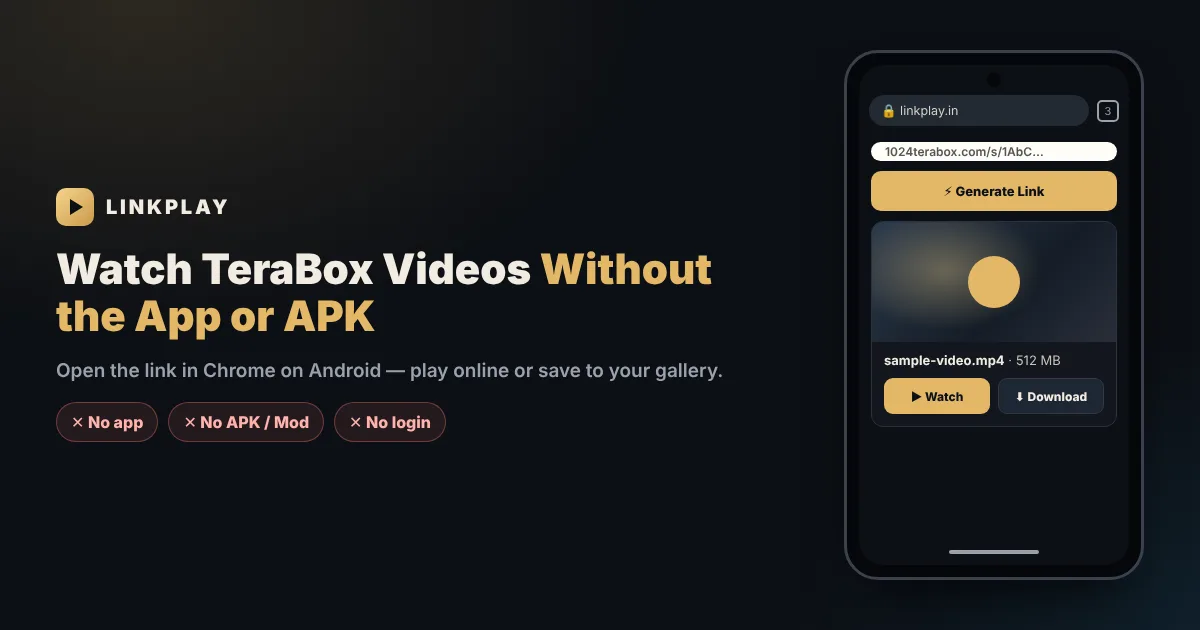
Skip the TeraBox app and risky Mod APKs. Paste any TeraBox link below and watch the video in your browser, or download it straight to your phone’s gallery. Works as a free TeraBox player for Android, a TeraBox video downloader and a TeraBox link opener — with no app and no login.
Why People Look for TeraBox Without the App
You tap a TeraBox link on your phone and, instead of the video, you are asked to install the TeraBox app, sign in, or tap “Open in app”. If you only want to watch one video a friend shared, that is a lot to ask:
- Storage — the app and its cache take space that many phones do not have.
- Login — the app wants an account even for a single shared file.
- Ads and prompts — upgrade offers and pop-ups before you reach the video.
- Mod APK temptation — “no ads” versions spread on websites and Telegram, but they come with real risks.
LinkPlay removes the need for all of that. It is a TeraBox player and downloader that runs in your browser. Paste the share link in Chrome, and the video is ready to watch or download — no app, no APK file and no TeraBox login.
How to Watch TeraBox Without the App on Android
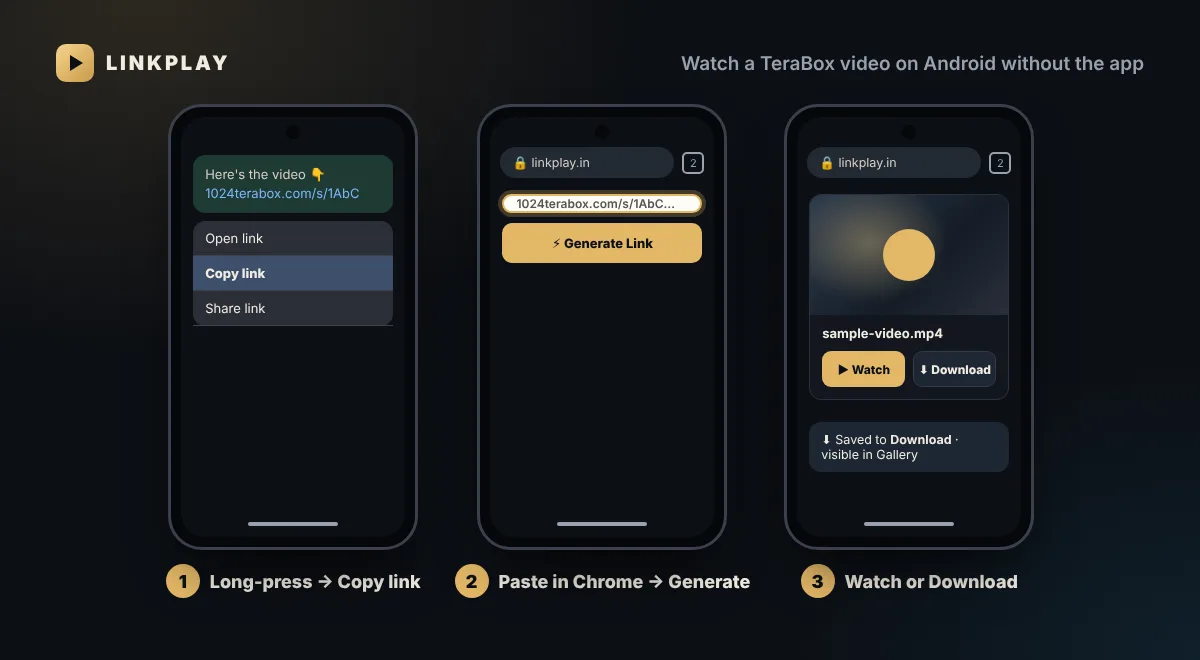
- 1In WhatsApp, Telegram or wherever you received it, long-press the TeraBox link and tap Copy. Do not tap the link itself, or it may open the app or the TeraBox site.
- 2Open linkplay.in in Chrome, paste the link into the box at the top and tap Generate Link.
- 3Tap Watch Now to play the video in Chrome, or Download to save it to your phone.
One Free Tool Instead of the TeraBox App
What most people need from the TeraBox app is simple: open a shared link, watch the video, maybe save it. LinkPlay does each of these in the browser:
Watch online
A TeraBox online player for Android: the video streams in Chrome, so nothing is saved and no space is used.
Download the video
A TeraBox video downloader for Android: Download saves the original file to your phone’s Download folder.
Links stay out of the app
Opens the link without triggering the TeraBox app — even if the app is installed — for 1024TeraBox, terafileshare and other TeraBox links.
No login, no APK
Only the public share link is needed. Nothing to install, no permissions and no TeraBox account.
TeraBox APK and Mod APK: What You Should Know
Many people search for “TeraBox APK” when the real goal is just to watch a video. It helps to separate the two kinds of APK:
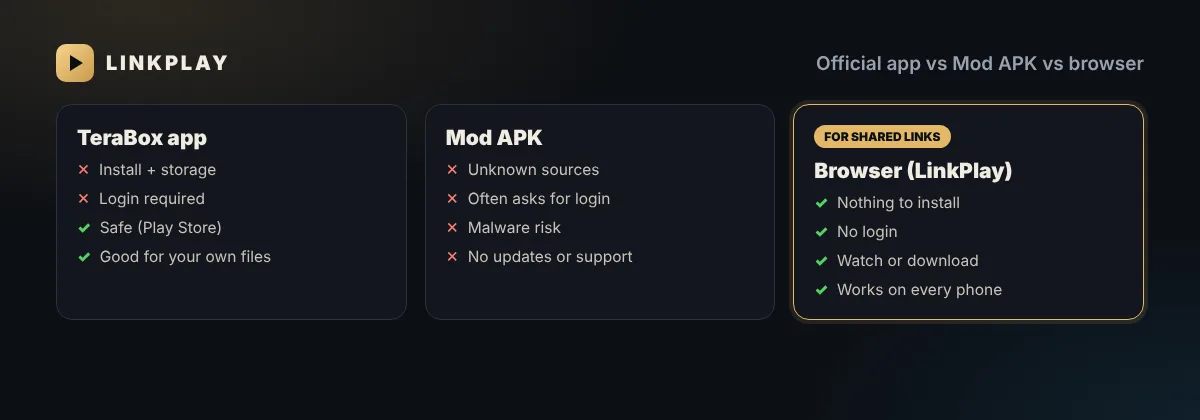
- The official TeraBox app from the Google Play Store is safe. It is the right choice if you upload and manage your own files, but it needs an account.
- APK files from websites — including “Mod”, “Premium unlocked” or “no ads” versions — are modified copies. They require the “install unknown apps” permission, receive no official updates and may contain hidden code.
- Login risk — many modded apps ask you to sign in. Entering your TeraBox account in an unofficial app can expose it to others.
If you have already installed a Mod APK, uninstall it, change your TeraBox password and run a Play Protect scan. Our guide on TeraBox Mod APK and no-ads versions explains the risks in more detail.
Stop TeraBox Links Opening in the App
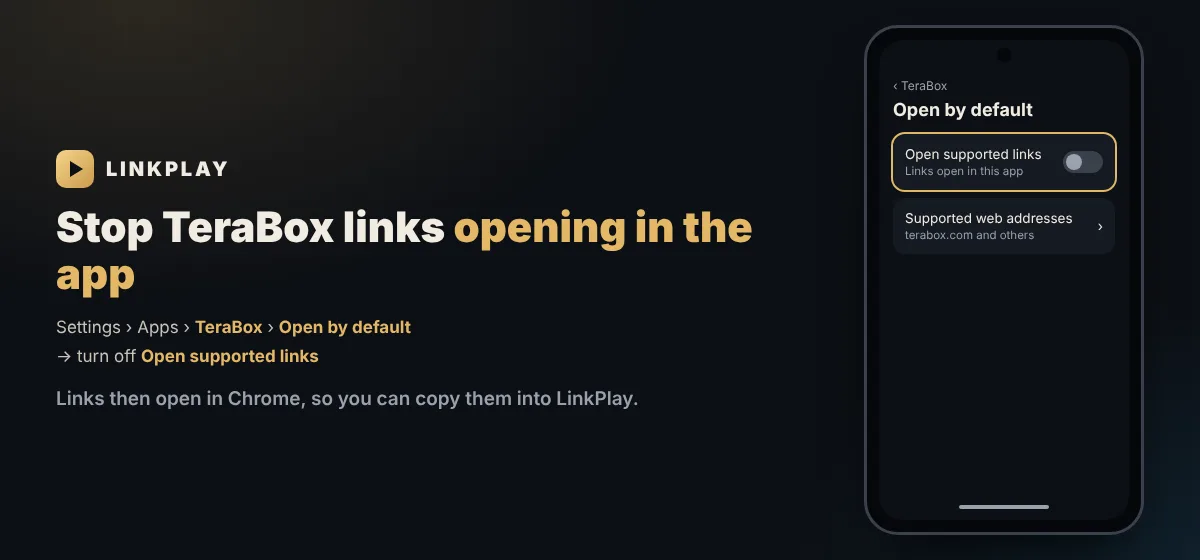
If the TeraBox app is installed, Android may open every TeraBox link inside it automatically. You can switch this off in a few taps:
- 1Open Settings › Apps and choose TeraBox.
- 2Tap Open by default (on some phones it is called Set as default).
- 3Turn off Open supported links. TeraBox links now open in your browser instead.
Even easier: do not tap the link at all. Long-press it, choose Copy and paste it into LinkPlay.
Where Downloaded TeraBox Videos Go on Android
Chrome saves downloads to the Download folder of your phone’s internal storage. You can find the video in three places:
- Chrome — tap ⋮ › Downloads to see recent files and open them.
- Files app — open Files (or My Files on Samsung) › Downloads.
- Gallery / Google Photos — most gallery apps show a “Download” folder; in Google Photos look under Library › Photos on device.
Video Won’t Play or Has No Sound?
Playback depends on how the file was encoded. Here is what to expect on Android:
| File type | Plays in Chrome? | What to do |
|---|---|---|
| MP4 (H.264) | Yes | Watch online or download |
| MKV | Often, depends on the codecs inside | If it fails, download and open in VLC |
| AC3 / E-AC3 audio | Video may play without sound | Download and play in VLC for Android |
VLC for Android is free on the Play Store, has no ads and plays almost every video format. If a TeraBox video is silent or shows a black screen in Chrome, downloading it and opening it in VLC fixes it in nearly every case.
Without the App on Every Device
LinkPlay is a website, so the same link works everywhere. Each device has small differences, which these guides cover in detail:
iPhone and iPad
Watch in Safari and save videos to Photos. See TeraBox player for iPhone.
Windows, Mac and Linux
No desktop app or emulator needed. See TeraBox player and downloader for PC.
Telegram
Send the link to the LinkPlay TeraBox downloader bot and get Play and Download in the chat.
Smart TV
Use the TV’s browser, or cast from Chrome. See TeraBox on Smart TV.
LinkPlay vs TeraBox App vs Mod APK
| LinkPlay (browser) | TeraBox app | Mod APK | |
|---|---|---|---|
| Install | None | Play Store | Unknown source |
| TeraBox login | Not needed | Required | Often asked |
| Storage used | None until you download | App + cache | App + cache |
| Safety | Nothing on your phone | Safe | Risky |
| Best for | Shared links | Your own files | Not recommended |
Problems Opening TeraBox Without the App
- Link opens the TeraBox app — long-press and copy it instead, or turn off Open supported links as shown above.
- Button seems stuck — a VPN or an ad-blocking browser can slow the check under the box. Give it a few seconds, or try plain Chrome without the VPN.
- Error says the link is gone — no app or APK can bring back a deleted share. Ask for a fresh link; details in expired and invalid TeraBox links.
- Folder link — folder and photo links open with LinkPlay Premium; for a free single video, share that video's own link. See the TeraBox folder link opener.
- Slow on a budget phone — close other apps and choose 480p, which needs far less data and memory. More tips in the buffering guide.
- Download stops — keep Chrome open and the screen on for large files, and check your free storage.
Error codes and their meaning are listed in why TeraBox links fail; playback issues are covered in the not-playing guide.
Nothing Installed, Nothing Shared
- No APK means no permissions: LinkPlay cannot see your contacts, photos or files.
- Your TeraBox account stays untouched — you never type a password or OTP.
- LinkPlay does not host anyone’s files; it only opens the links you paste. Read the TeraBox safety guide and our privacy policy.
FAQs — TeraBox Without the App
Can I watch TeraBox videos without the app? +
Yes. Paste the TeraBox share link into LinkPlay in any browser and tap Generate Link. The video plays on the page or can be downloaded, without the TeraBox app and without a TeraBox account.
Is there a safe alternative to the TeraBox APK or Mod APK? +
Yes. Instead of installing an APK file from outside the Play Store, open the link in Chrome with LinkPlay. Nothing is installed, so there is no unknown-sources permission and no risk of a modified app on your phone.
Is TeraBox Mod APK safe? +
Mod APKs are modified copies of the app shared on third-party websites. They need the “install unknown apps” permission, receive no official updates and can contain hidden code. Many ask you to sign in, which puts your account at risk. For shared videos, a browser is the safer option.
How do I download a TeraBox video on Android without the app? +
Open linkplay.in in Chrome, paste the TeraBox link, tap Generate Link and then Download. Chrome saves the video to the Download folder of your phone.
Where do TeraBox videos download on Android? +
Chrome saves them to the Download folder in your phone’s internal storage. Open Chrome’s menu › Downloads, or the Files app › Downloads. Most gallery apps and Google Photos also show the video in a “Download” folder.
How do I stop TeraBox links opening in the app? +
Go to Settings › Apps › TeraBox › Open by default (on some phones “Set as default”) and turn off Open supported links. TeraBox links will then open in your browser. Or simply long-press the link and choose Copy.
Do I need a TeraBox login to watch a shared video? +
No. LinkPlay only needs the public share link. It never asks for your TeraBox email, password or OTP.
Why does the TeraBox video play without sound on Android? +
Some videos, often MKV files, use AC3 or E-AC3 audio that Chrome cannot play. Download the video and open it in VLC for Android, which plays these formats with sound.
Does LinkPlay work on every Android phone? +
Yes. It works in Chrome, Samsung Internet, Edge, Firefox and other modern browsers on Android phones and tablets, including low-storage phones, because nothing is installed.
Can I open 1024TeraBox links without the app? +
Yes. 1024terabox.com links often try to open the app or a sign-in page; pasted into LinkPlay in Chrome, they open straight to the video.
Can I watch TeraBox without the app on iPhone or PC? +
Yes. LinkPlay works in every browser. See the dedicated guides for iPhone and iPad and for Windows, Mac and Linux.
Is it cheaper than TeraBox Premium? +
Watching shared videos on LinkPlay is free, so for that purpose you do not need TeraBox Premium at all. LinkPlay’s own Premium (₹49 for 30 days) is optional and only adds unlimited downloads and no ads.