Open and View Any TeraBox Folder Link Online
Videos · Photos · Subfolders — No App, No Login
Paste a TeraBox folder link below to see everything inside it. Play the videos, view and save the original photos, and open subfolders — a TeraBox folder link opener and folder viewer for LinkPlay Premium members, in any browser and in Telegram.
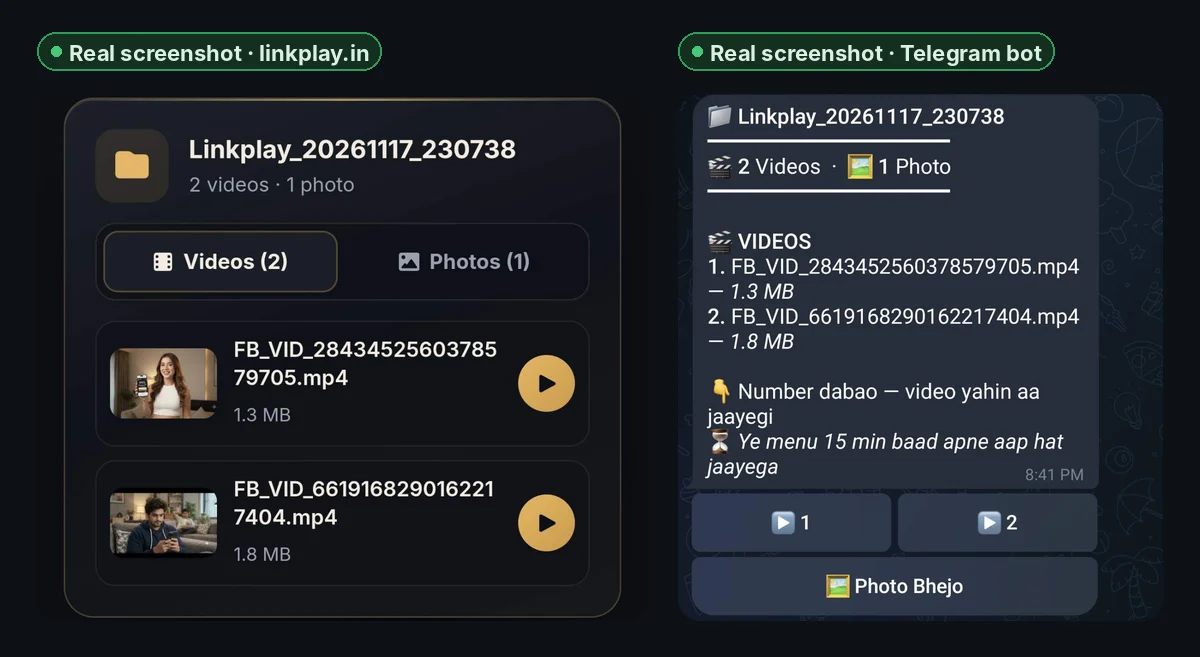
What Is a TeraBox Folder Link?
A TeraBox share link can point to one file or to a whole folder — a trip album, a course with many lessons, or a set of episodes. Opening a folder link usually means installing the TeraBox app or signing in before you can see what is inside.
LinkPlay is a TeraBox folder link opener that works in your browser. Paste the folder link above and, with LinkPlay Premium, it shows every video, photo and subfolder in the share, ready to watch or save — no app, no login.
How to Open a TeraBox Folder Link
- 1Copy the TeraBox folder link — long-press it in WhatsApp or Telegram and tap Copy.
- 2Paste it into the box at the top of this page and tap Generate Link.
- 3The folder opens. Pick a tab — Videos, Photos or Folders — and tap what you want to watch, view or download.
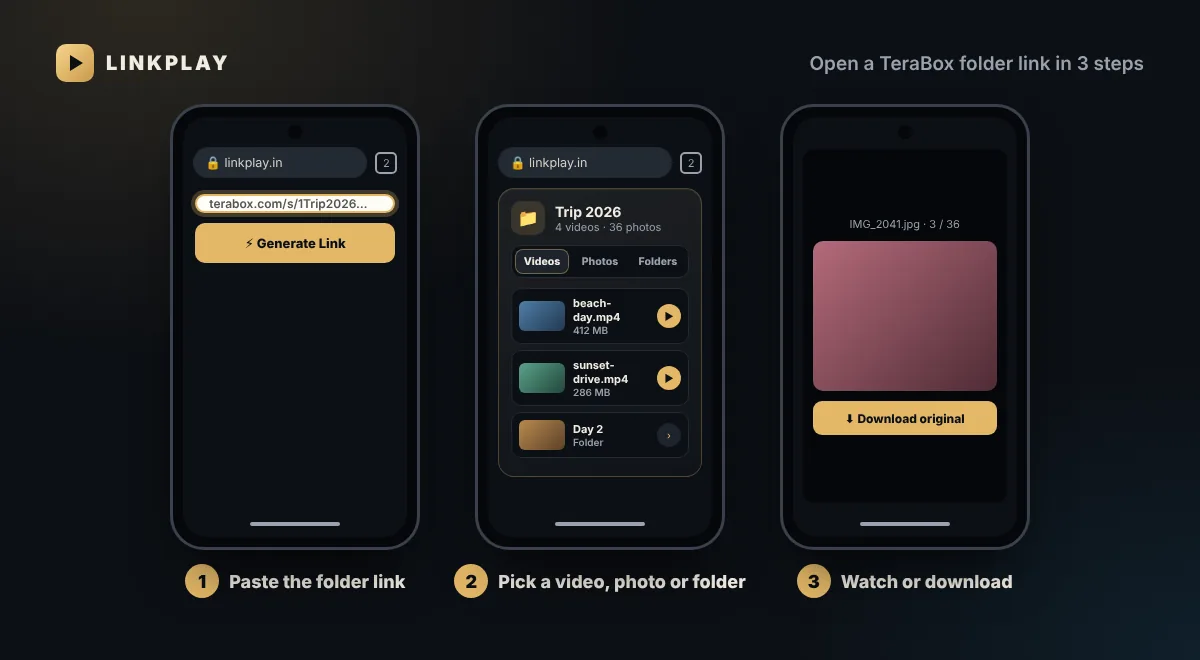
Everything Inside the Folder, in One View
LinkPlay works as a TeraBox folder viewer. The top of the card shows the folder name and how many videos, photos and folders it holds; tabs keep each type separate:
Videos
Every video with its preview and size. Tap one to open it in the player, then Watch or Download.
Photos
A grid of photo previews. Tap a photo to view it full screen and swipe through the rest.
Folders
Subfolders open in place, with a Back button and the path shown above the list.
Other files
PDFs, archives and documents are counted so you know they are there, but only videos and photos open here.
Watch and Download Videos From a TeraBox Folder
Tap any video in the Videos tab and it opens in the same player LinkPlay uses for single links. Watch Now streams it in your browser; Download saves the original file.
- One video at a time — open the ones you want, in any order; the folder list stays above the player.
- Original quality — the download is the same file the owner uploaded, not a re-encoded copy.
- Any device — Android, iPhone, Windows, Mac and Linux, in any modern browser.
View and Download TeraBox Photos
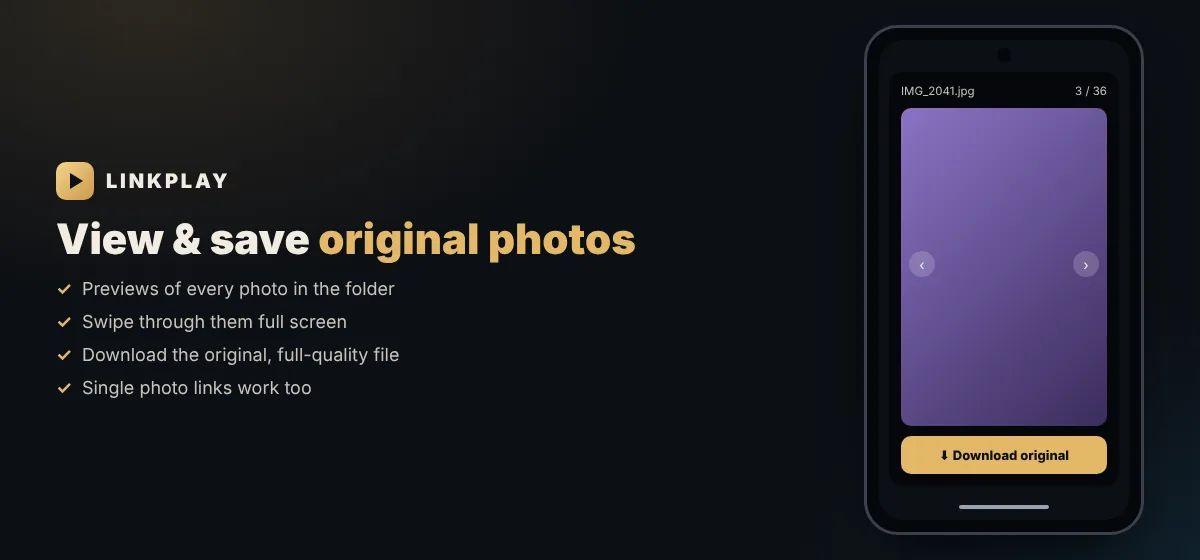
Photo albums are one of the most common TeraBox folder shares. In the Photos tab, LinkPlay works as a TeraBox photo downloader:
- Tap a photo to open it full screen; swipe or use the arrows to move through the album.
- Download original saves the full-quality photo, not the small preview.
- A link to a single photo works too — paste it and you get the photo with a Download photo button.
Folder Links on Every Device
Because LinkPlay runs in the browser, a folder link opens the same way everywhere. These guides cover the details of each device:
Android
Open folders in Chrome and save videos to your gallery. See TeraBox without the app.
iPhone and iPad
Open folders in Safari; save videos to Files or Photos. See TeraBox player for iPhone.
Windows, Mac and Linux
Browse a folder on the big screen and save files to Downloads. See TeraBox for PC.
Chrome extension
Right-click a TeraBox link and choose Open with LinkPlay. Get the LinkPlay extension.
TeraBox App vs LinkPlay for Folder Links
| LinkPlay | TeraBox app | |
|---|---|---|
| Install | None | App + storage |
| TeraBox login | Not needed | Required |
| See videos, photos and subfolders | Yes | Yes |
| Watch videos | In the browser | In the app |
| Save original photos | Yes | Yes, with an account |
| Works on PC without software | Yes | No |
Folder Link Not Opening?
- Folder deleted or share cancelled — no tool can bring it back; ask the sender for a new link.
- Password-protected folder — only links shared without a password can be opened.
- Half-copied link — copy the full link again; it should contain /s/.
- A video will not play — some files use formats browsers cannot decode. Download it and play it in VLC; see TeraBox video not playing.
- Slow to open — the first time a large folder is opened it can take a few seconds; reopening it is faster.
Every TeraBox error and its meaning is listed in why TeraBox links fail.
Folder Links in Telegram
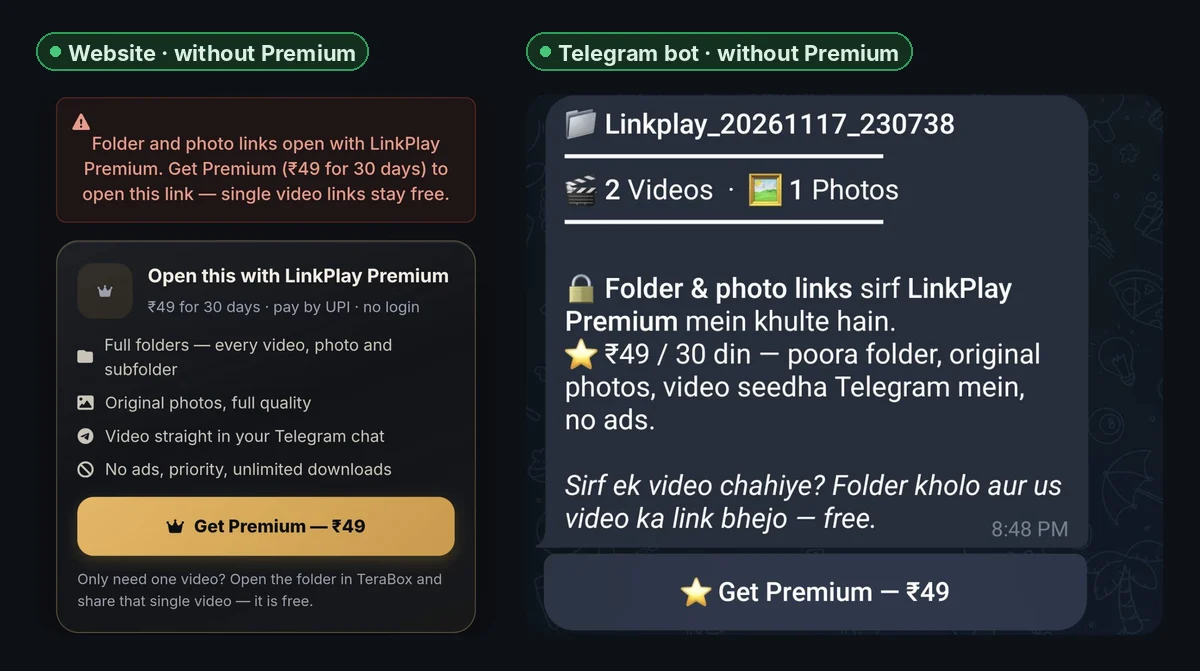
Prefer Telegram? Premium members can send a folder link to the LinkPlay Telegram bot. It replies with the folder name and counts, a button for each video, one button that sends all the photos in original quality, and buttons for subfolders — no commands to type.
Private and Safe
- LinkPlay only opens the links you paste. It does not host, list or recommend anyone’s files.
- No login: your TeraBox account, email and password are never asked for.
- Nothing to install, so no permissions on your phone. Read our privacy policy and the TeraBox safety guide.
FAQs — TeraBox Folder Links
How do I open a TeraBox folder link? +
Copy the folder link, paste it into the box at the top of this page and tap Generate Link. With LinkPlay Premium the folder opens with Videos, Photos and Folders tabs, so you can see everything inside and pick what you want.
Can I open TeraBox folder links in Telegram? +
Yes, with LinkPlay Premium. Send the folder link to @OfficialLinkplay_bot: it shows the folder with a button for each video, a button that sends all the photos, and buttons for subfolders. Tap a video and it arrives in your chat.
Can I watch the videos inside a TeraBox folder without the app? +
Yes. Tap any video in the Videos tab. It opens in the LinkPlay player in your browser, where you can watch it or download the original file. No TeraBox app and no account are needed.
How do I download photos from a TeraBox folder? +
Open the Photos tab and tap a photo. It opens full screen; swipe or use the arrows to move between photos, and tap Download original to save the full-quality file to your phone or computer.
Can I open a single TeraBox photo link? +
Yes. Paste a link to one photo and LinkPlay shows the photo with its size and a Download photo button for the original file.
Can I open folders inside a TeraBox folder? +
Yes. Subfolders appear in the Folders tab. Tap one to open it, and use the Back button to return to the folder you came from.
Can I download a whole TeraBox folder at once? +
Not in one click. You can download every video and every photo in the folder one by one, straight from the list, without opening TeraBox.
Does it work with 1024TeraBox and other TeraBox folder links? +
Yes. Folder links from terabox.com, 1024terabox.com, teraboxapp.com, terafileshare.com and the other TeraBox domains all open the same way.
Why can some files in the folder not be opened? +
LinkPlay opens videos and photos. Other files in a folder, such as PDFs, ZIP archives or documents, are counted but cannot be opened here.
What if the folder has hundreds of files? +
Large folders open page by page. Use the Next and Previous buttons under the list to move through all the files.
Do I need a TeraBox account or login? +
No. LinkPlay only needs the public share link of the folder. It never asks for your TeraBox email, password or OTP.
Why does a TeraBox folder link not open? +
Usually the owner deleted the folder, cancelled the share or added a password. Only the sender can fix those; ask them for a fresh link. Our guide to why TeraBox links fail explains every error.
Is the TeraBox folder link opener free? +
Folder and photo links are part of LinkPlay Premium — ₹49 for 30 days, paid by UPI with no login. Premium also removes ads and sends videos straight to Telegram. Single video links stay free: open the folder in TeraBox and share the video you want.