TeraBox Downloader Bot on Telegram
Free · No Login · Every TeraBox Link
On a computer?
Scan this with your phone camera to open the bot in Telegram.
Received a TeraBox link in Telegram? There is no need to leave the app. Send it to the LinkPlay bot and it replies with the video, ready to play, download or receive directly in your chat. Prefer the website? Paste the link below instead.
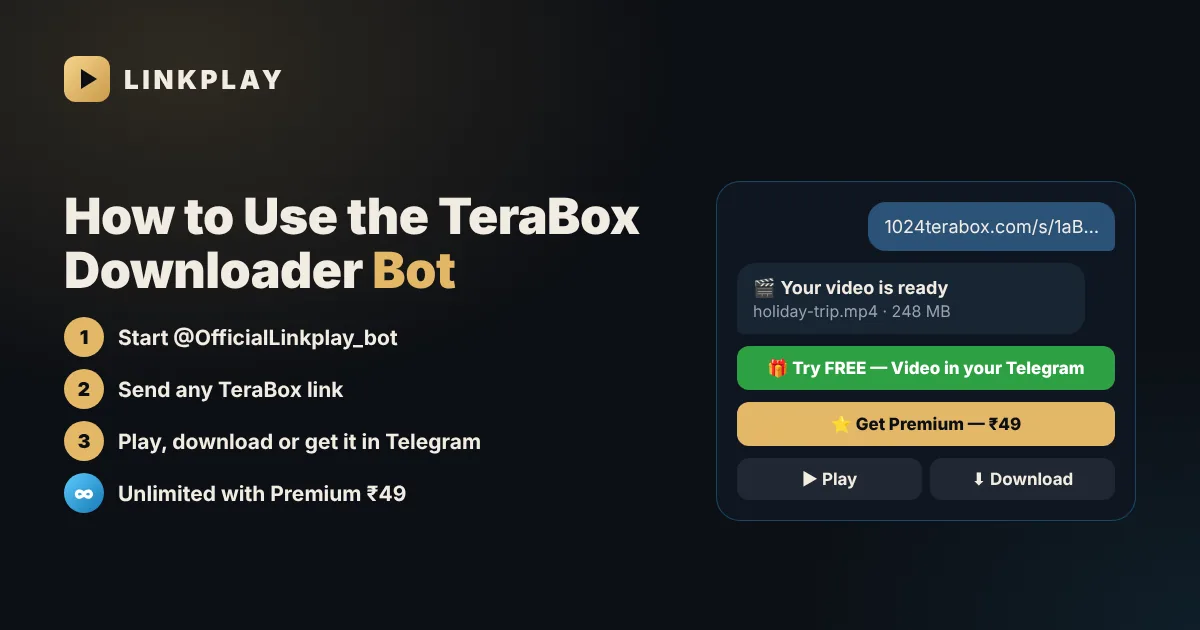
The Problem With Most TeraBox Bots
Search Telegram for “TeraBox downloader bot” and you will find dozens of options. Many users try several before finding one that actually works. These are the most common complaints:
You send a link and receive another link, which leads through pop-ups and countdown timers before the video appears.
A bot that asks for your email or password puts your account at risk. A public share link never requires it.
Many bots run briefly, collect users and then stop responding, so you have to start searching again.
“Something went wrong” does not tell you whether the file was deleted, the share was cancelled or the link points to a folder.
The LinkPlay TeraBox Telegram bot was built to solve these problems. It is the Telegram version of LinkPlay, the browser-based TeraBox player, and follows the same principles:
The bot replies with a video card that has Play and Download buttons, directly in the chat.
Only the public share link is needed. No TeraBox account and no login.
A link that opens on linkplay.in also opens in the bot, and vice versa.
Deleted file, cancelled share, folder link or password — the bot states the exact reason, so you know what to ask the sender.
248 MB · ready to play
How to Download TeraBox Videos With the Telegram Bot
- 1Open @OfficialLinkplay_bot in Telegram and tap Start.
- 2If prompted, join the LinkPlay channel once. It is free and unlocks the bot — a single channel, not a long list.
- 3Copy the share link from TeraBox or from the chat where you received it (Share → Copy link).
- 4Paste the link in the bot and send it.
- 5The bot replies with a video card. Tap ▶ Play to stream it or ⬇ Download to save the original file.
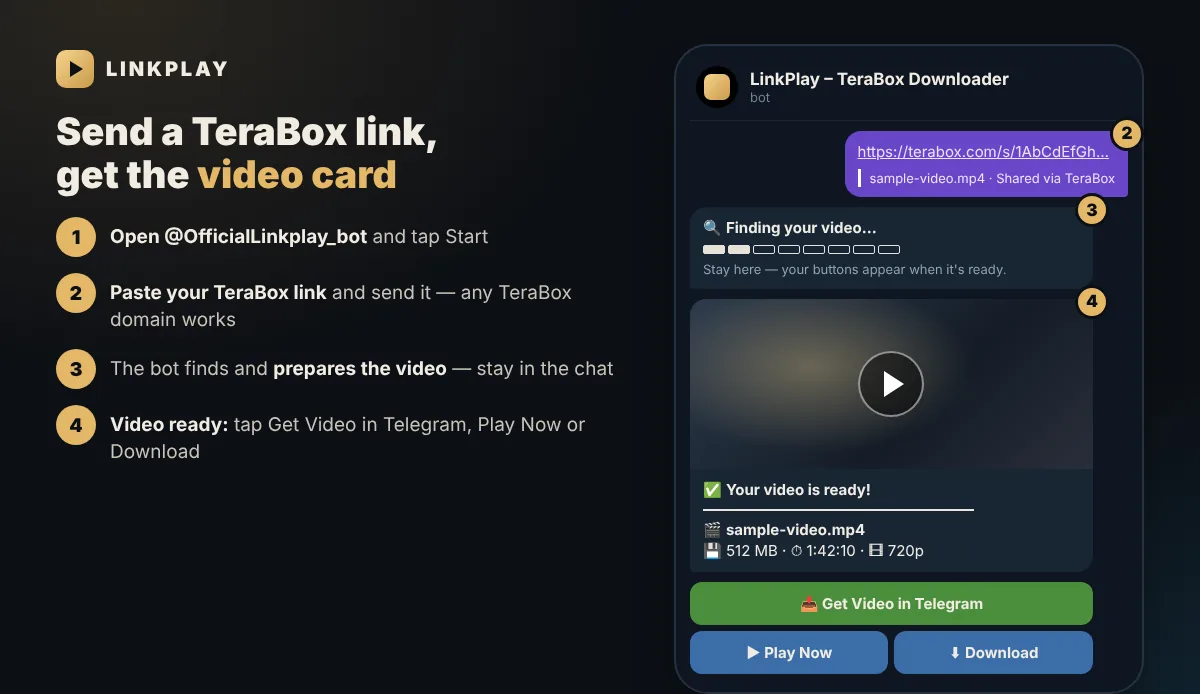
Get the TeraBox Video Straight Into Telegram
Play and Download open the video in your browser. If you prefer to keep everything inside Telegram — to watch offline, save it to your gallery or forward it — the bot can turn your TeraBox link into a video in Telegram:
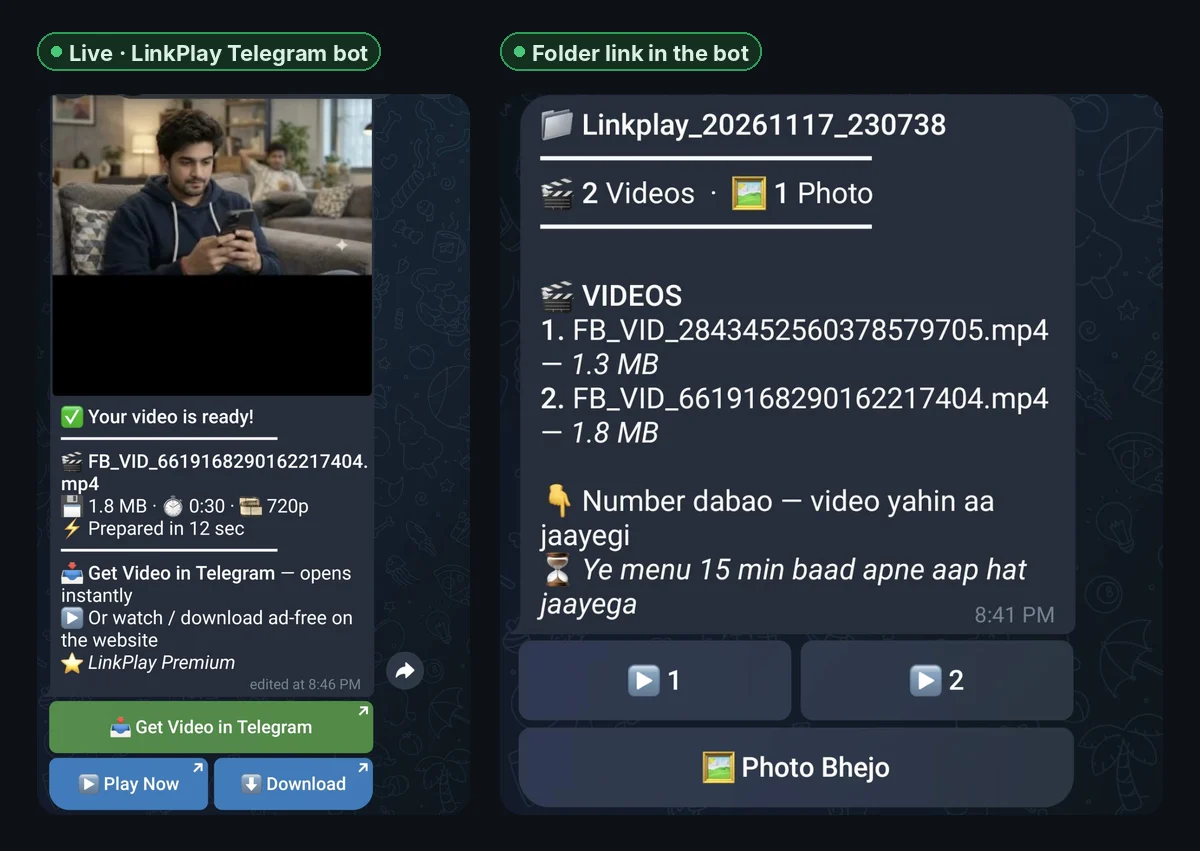
- 1Send a TeraBox link to the bot as usual.
- 2On the video card, tap 📥 Get Video in Telegram (on your free tries the button says 🎁 Try FREE — Video in your Telegram).
- 3A helper chat opens. Tap Start there.
- 4The video is sent to that chat as soon as it is ready. Larger files take a little longer. Watch it, forward it, or tap ⋮ → Save to Gallery.
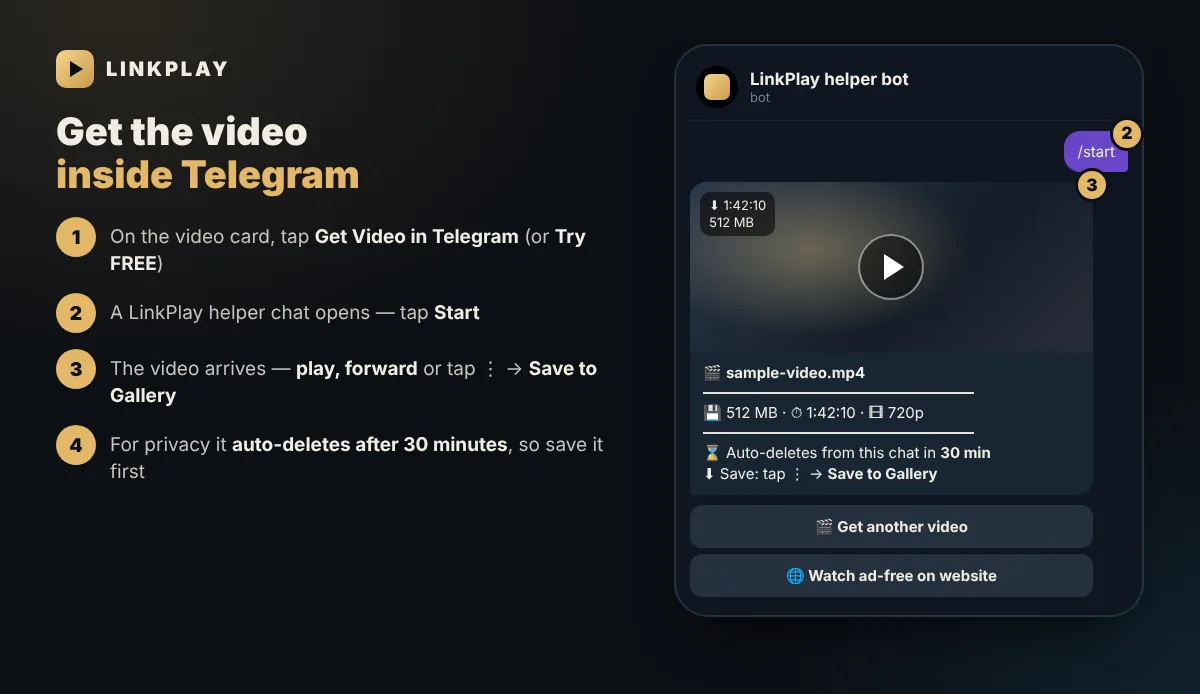
Your first videos in Telegram are free, so you can try it before deciding. After that, Telegram delivery is included in LinkPlay Premium.
What the Bot Can and Can’t Do
Any public link to one video, in MP4, MKV and other common formats.
terabox.com, 1024terabox.com, teraboxapp.com and the rest (full list below).
The bot opens one video at a time. Open the folder in TeraBox and share the individual video.
Only the uploader can resolve these. The bot tells you which case applies.
If a link fails, our TeraBox error guide explains every message, and expired and invalid links covers what you can still do.
Supported TeraBox Links
TeraBox shares files through many different domain names, which is why a link can look unfamiliar. The bot supports all of the following:
Links from any of these domains in the usual …/s/1AbC… format work the same way. If you come across a new TeraBox domain that does not open, let us know in the LinkPlay channel.
Bot or Website: Which Should You Use?
| Telegram bot | LinkPlay website | |
|---|---|---|
| Best for | Phones, people who live in Telegram | PC, laptop, TV browsers |
| Play online | Yes | Yes |
| Download original file | Yes | Yes |
| Video delivered into Telegram | Yes (free tries, then Premium) | No |
| Resume where you stopped | The video stays in your chat | Yes (Continue watching) |
| Login needed | No | No |
Both use the same LinkPlay engine. On a computer the website for PC is usually the most convenient; on a phone the bot saves you from switching apps.
Unlimited Downloads in Telegram
- Unlimited downloads (fair use up to 100 GB a day)
- Every video delivered straight into Telegram
- No ads in the bot or on the website
- No login — pay by any UPI app
- 1In the bot, tap ⭐ Get Premium — ₹49 (or open linkplay.in/premium).
- 2Pay ₹49 with Google Pay, PhonePe, Paytm or any UPI app.
- 3Premium is activated once the payment is confirmed. Website purchases also include a Premium Key for use on any browser.
Or earn it free: send /refer in the bot and share your personal invite link. For every 2 friends who join and receive their first video, you get 7 days of Premium. Not sure whether you need Premium? Read TeraBox Premium vs LinkPlay Premium.
Bot Commands
/startStart the bot and see how it works/helpStep-by-step help and common problems/premiumLinkPlay Premium — ₹49 for 30 days/referYour invite link — 2 friends = 7 days Premium freeCommands are optional — to download, simply send a link.
TeraBox Bot Not Working? Quick Fixes
- No reply after Start — join the channel when prompted, then send /start again.
- “Slow down” message — too many links in a short time. Wait a minute and try again.
- Folder link — share a single video from inside the folder.
- Link invalid or expired — the file was deleted or the share was cancelled. Ask the sender for a new link.
- Video won’t play on iPhone — some MKV files need the Download button. See TeraBox on iPhone.
- Buttons stopped working — they expire after about 15 minutes. Send the link again for fresh ones.
Works on Every Telegram App
The bot runs inside Telegram itself, so it works wherever Telegram does — nothing extra to install:
Telegram for Android. Videos can be saved to your gallery from the chat.
Telegram for iOS. Use “Save to Photos” on the video, or Download for MKV files Safari cannot play.
Telegram Desktop. Videos save to your Downloads folder.
web.telegram.org in any browser. On a computer, the LinkPlay website is often even simpler.
Use the Official Bot Only
Because the bot is popular, copies with similar names may appear. To stay safe:
- Check the username is exactly @OfficialLinkplay_bot — or open it from this page or from linkplay.in.
- LinkPlay never sends you a private message asking for money. Premium is only bought through the bot’s own button or linkplay.in/premium.
- Never share a Telegram login code, a TeraBox password or a UPI PIN with anyone, including a bot.
Privacy and Safety
- The bot never asks for your TeraBox email, password or OTP.
- Videos sent to the helper chat are deleted automatically after 30 minutes, and the main chat is cleaned up too.
- LinkPlay does not upload or host anyone’s files; it only opens the links you send. See our privacy policy.
- Avoid bots and “Mod APK” apps that request your login. Our TeraBox safety guide explains the risks.
Planning to share a TeraBox video with friends? See how to share TeraBox videos on WhatsApp and Telegram so it plays for everyone.
FAQs — TeraBox Telegram Bot
What is the best TeraBox downloader bot on Telegram? +
A good TeraBox bot returns the video itself, without link shorteners, never asks for your TeraBox password and explains clearly when a link cannot be opened. The LinkPlay bot, @OfficialLinkplay_bot, is built on these principles and uses the same engine as the LinkPlay website.
Is the LinkPlay TeraBox bot free to use? +
Yes. Opening links, streaming and downloading are free. Your first videos delivered directly into Telegram are also free. LinkPlay Premium (₹49 for 30 days) is optional and adds unlimited downloads, an ad-free experience and Telegram delivery for every video.
How do I use a TeraBox bot on Telegram? +
Open @OfficialLinkplay_bot, tap Start and, if prompted, join the LinkPlay channel. Then paste your TeraBox share link and send it. The bot replies with a video card containing Play and Download buttons.
Can the bot send the TeraBox video directly into Telegram? +
Yes. Tap “Try FREE — Video in your Telegram” on the video card, then tap Start in the helper chat that opens. The video is sent to that chat once it is ready, and you can watch, save or forward it.
Does the bot support 1024TeraBox and other TeraBox domains? +
Yes. The bot supports terabox.com, 1024terabox.com, teraboxapp.com, terafileshare.com, teraboxlink.com and the other TeraBox domains listed on this page.
Why is the TeraBox bot not responding? +
Make sure you have tapped Start and joined the channel when prompted, then send /start again. If you have sent many links in a short time, wait a minute before trying again. Folder links, deleted files and password-protected links cannot be opened.
Is LinkPlay the official TeraBox bot? +
No. LinkPlay is an independent service and is not affiliated with TeraBox. The official LinkPlay bot is @OfficialLinkplay_bot; it opens public TeraBox share links and never asks for your TeraBox account.
Does the bot need my TeraBox login or password? +
No. The bot only requires the public share link. It never asks for your TeraBox email, password, OTP or any other account access.
How can I get unlimited TeraBox downloads in Telegram? +
Tap “Get Premium — ₹49” in the bot or visit linkplay.in/premium. Premium lasts 30 days and includes unlimited downloads, no ads and Telegram delivery for every video. You can also invite friends: every 2 friends who join and receive their first video earn you 7 days of Premium free.
Ready to stream?
Prefer the website? Scroll up and paste your TeraBox link — or open the bot in Telegram.
Back to Top